Upcoming changes in Project Flow
Milient continuously releases updates and improvements to Project Flow by Moment to enhance functionality and user experience.
The following will provide information that will be accessible throughout the week:
- Change in behavior
- New features
- Bugfixes
- Functionality that has been removed or replaced

Changes:
Report Performance and Exports
Reports could be slow when working with large amounts of data, and exports did not always reflect the filters selected by the user.
Reports now load significantly faster, even with large datasets. Excel and PDF exports will always match the columns, sorting, and filters selected in the report.
Where to find it?
Available in all reports across Project Flow.
Department Filtering & Grouping
Why?
Managers needed a simpler way to focus on their own teams when reviewing absence and overtime data.
What's changed?
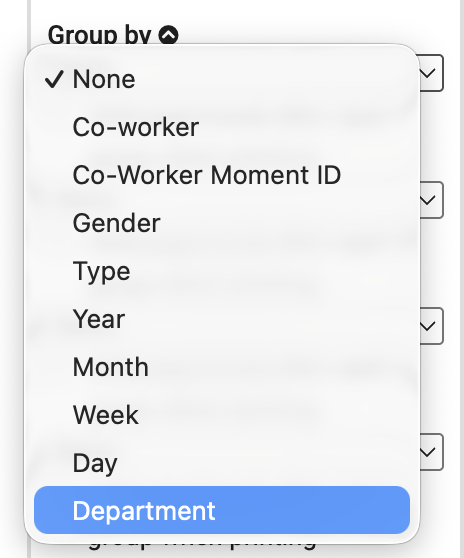
Absence and overtime can now be grouped and filtered by department, making it easier to find relevant information and analyse data for specific teams. Department names are also displayed in a consistent format across the system, improving sorting and readability.
Where to find it?
You can find this functionality in the Absence Report, Absence Calendar and Overtime Report.
Moving between different parts of the system could sometimes feel inconsistent, and the same functionality was not always named the same way across modules.
Navigation throughout the system is now smoother, providing a more seamless experience when moving between pages. We've also standardized terminology across the platform, so functions are named consistently regardless of where you are in the system.
Where to find it?
Available across all areas of Project Flow.
New Functions:
Better Admin Controls
Why?
Administrators needed better visibility and control over background processes, such as integrations and large report exports.
What's changed?
Background jobs now run more reliably, reducing the risk of duplicate processing or interruptions. Administrators can also monitor job status in real time and stop jobs that were started by mistake or are taking longer than expected.
Where to find it?
Available in the Scheduled Tasks section for users with administrator permissions.
Improved Security & Monitoring
Why?
To improve security and help us identify issues more quickly.
What's changed?
We've strengthened security measures and improved system monitoring, helping us detect and resolve issues faster while providing a more reliable user experience.
Where to find it?
This update works behind the scenes and applies across the entire Project Flow application.
New Absence Calendar
Why?
The previous absence calendar offered limited filtering options and was not always easy to use when managing larger teams.
What's changed?
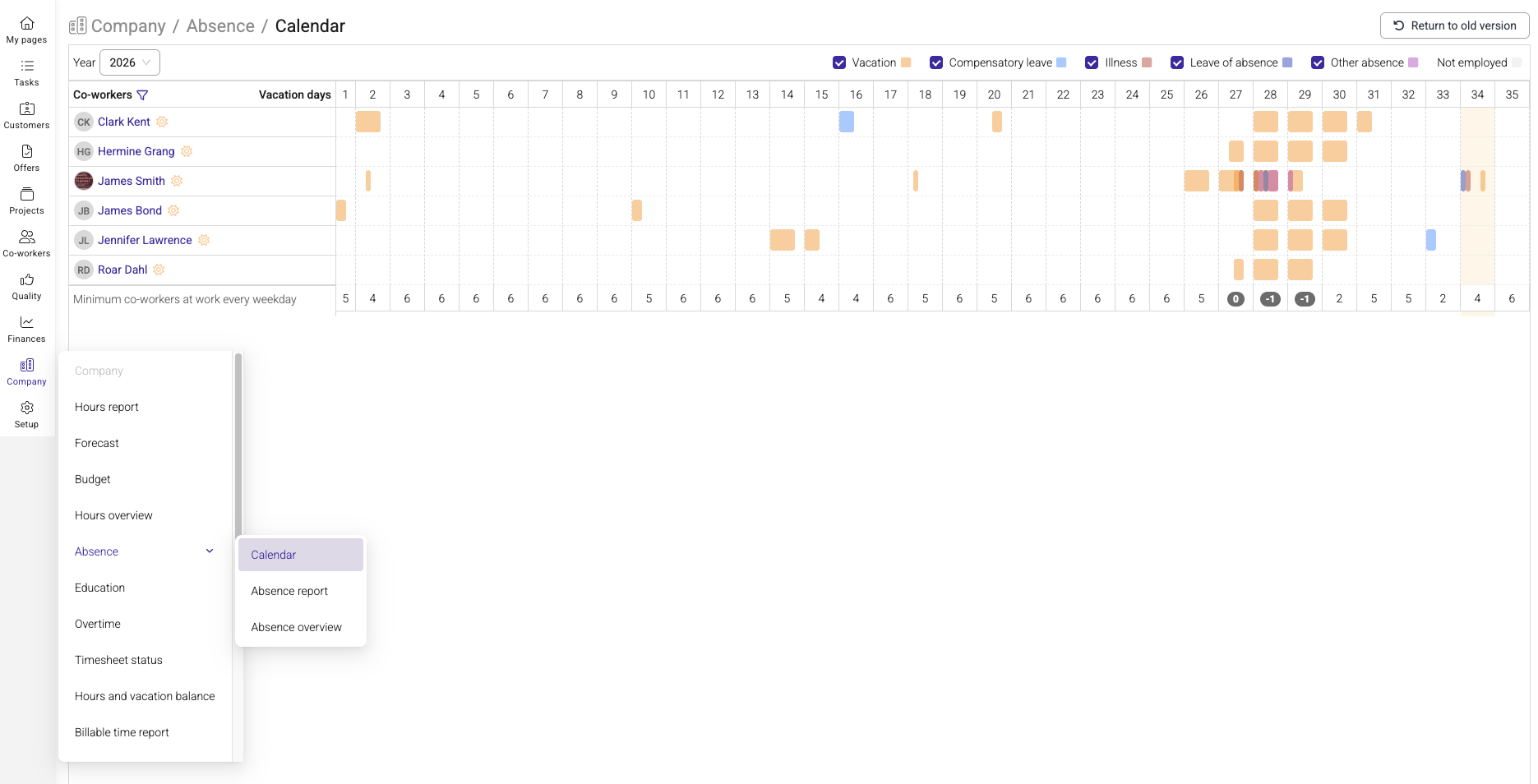
The new Absence Calendar is now available to all users. It provides a more intuitive layout, a clearer distinction between planned and approved absence, and makes it easier to filter by colleagues or teams when reviewing availability and capacity.
Where to find it?
Company > Absence > Calendar
Bug Fixes:
- Issue: Daily totals in the print-view did not always calculate correctly.
- Fix: Printed timesheets now match the registered timesheet entries accurately.
- Issue: Project managers could occasionally lose access to invoicing details on their own projects.
- Fix: Access permissions have been corrected and now follow the intended role settings.
- Issue: Excel exports could contain missing project information and incomplete descriptions.
- Fix: Exported reports now include all relevant project information and full descriptions.
- Issue: Export files could be incomplete for employees who had only registered absence or vacation.
- Fix: All relevant pay types are now included in the export.
- Issue: Hours reports could display incorrect sorting when grouped by department.
- Fix: Sorting and display behavior have been corrected.
Removed Functionality:
Previous Report Options
Why?
The Virtual View, Print, and Print Preview options relied on older technology that was no longer supported.
What's replacing it?
The standard report view now provides the same performance benefits, along with improved PDF and Excel export options.
Where to find it?
Available in all reports across Project Flow.
Previous Absence Calendar
Why?
Maintaining two separate absence calendars led to an inconsistent user experience.
What's replacing it?
All users have been migrated to the new Absence Calendar, which offers improved usability, filtering, and functionality.
Where to find it?
Available in the Absence Calendar.
Summary:
Faster, more accurate reports
Reports now load significantly faster, even when working with large datasets.
In addition, ExcelPDF exports now always reflect the filters selected on screen.
Easier for department managers
Absence and overtime can now be grouped and filtered by department, making it easier for managers to focus on their own teams.
Smoother navigation
Navigation throughout the system is now smoother, eliminating the previous "flicker" effect when switching between pages. We've also standardized terminology to ensure functions are named consistently across the platform.
New absence calendar
All users now have access to the improved absence calendar, featuring a more efficient layout, clearer distinction between planned and approved absence, and the ability to filter by colleague or team.
Better admin controls
Background jobs, such as integrations and large report generation, now run more reliably. Administrators can also monitor job status in real time and stop jobs that take longer than expected.
Bug fixes
We've resolved several issues, including incorrect totals in printed timesheets, project managers losing access to invoicing details on their own projects, missing information in Excel exports of time reports, incomplete Visma Lønn exports for employees with only absence registered, and incorrect sorting in the hours report when grouped by department.
Removed functionality
The Virtual View, Print, and Print Preview buttons have been removed from reports. Please use the standard view and the PDF/Excel export option instead.
The previous absence calendar has also been removed, as all users have now been migrated to the new Absence Calendar.
Was this article helpful?
That’s Great!
Thank you for your feedback
Sorry! We couldn't be helpful
Thank you for your feedback
Feedback sent
We appreciate your effort and will try to fix the article