New changes in Project Flow
What's improved this week
This release adds your own budget and forecast exchange rates, lets you enter several invoice email addresses for a customer, and brings back a continuous timeline on the Milestones page. It also corrects several currency calculations and fixes errors in offers, expense claims and shared hours. In short:
- Administrators can set budget and forecast exchange rates for each currency.
- A customer's invoice email field takes several addresses and checks each one.
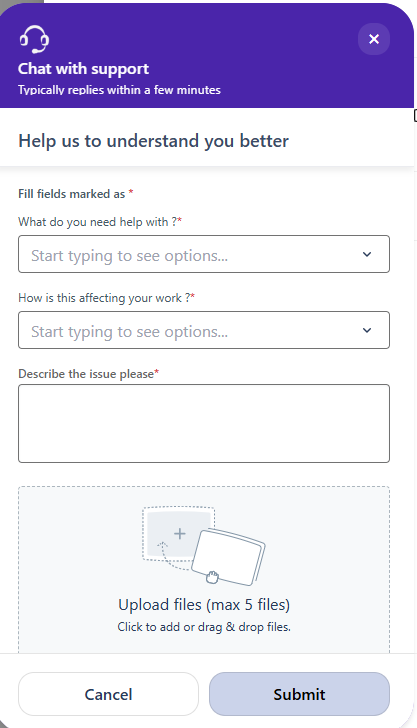
- Before you chat with support, you answer three short questions about your issue.
- The Milestones page is a continuous timeline again, with a button that jumps to the next upcoming milestone.
- Project budget figures update as soon as you register time, expenses, product sales or invoices.
- Credit notes imported from Fortnox, the Invoices report and project reports now handle currencies correctly.
- Several errors in offers, expense claims, files and shared hours have been fixed.
- 24SevenOffice integration rebranded as Finago.
Changes
Milestones Shown as a Continuous Timeline
Why? A previous update replaced the timeline with a paginated list, which made it harder to follow how a project progresses.
What's changed? The Milestones page is a continuous timeline again, with one scroll instead of pages and a period picker to filter by date range. The milestone title is now the main text, with the description and date beside it. A filled dot marks a milestone in the past and an outline marks one in the future, and a flag marks critical deadlines. The Activity column has been removed from the list, and Edit now appears as an icon when you hover over a milestone. When you create or edit a milestone you can link its date to another milestone, set a time and choose tags. The "Jump to upcoming milestone" button now always goes to the nearest upcoming milestone. It is greyed out with the tooltip "No upcoming milestones" when there is none in the period you have chosen.
Where to find it? The Milestones page in the project.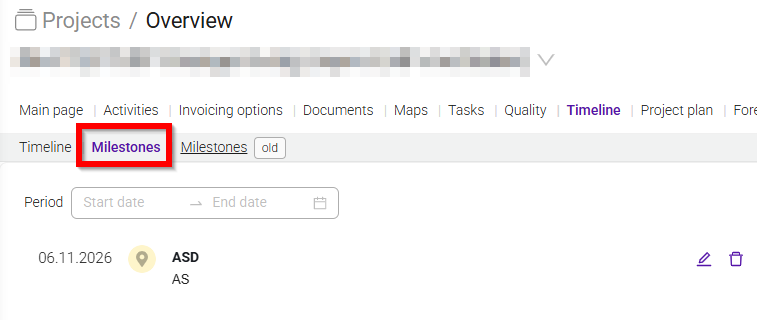
Project Budget Figures Update Straight Away
Why? Budget figures on the project overview could stay out of date for up to 24 hours after you registered new data.
What's changed? The figures are now refreshed when you register or change time records, expenses, product sales or invoices. The project overview and its sort order show the same figures.
Where to find it?
- The project overview.
- The project report.
Subscription Costs Use the Cost Currency's Own Exchange Rate
Why? When the cost and the sales price of a subscription line were in different currencies, the cost was converted with the sales exchange rate. Cost and margin could then be wrong.
What's changed? Cost is now converted with the exchange rate of its own currency, in both the project currency and the company currency. Margins show the difference between income and cost, each converted at its own rate. Lines where cost and sales use the same currency are unchanged.
Where to find it? Subscription lines, and the margins that are based on them.
A Lighter Watermark on Payment Reminders
Why? The watermark on payment reminders was dark and made the document harder to read.
What's changed? The watermark is now lighter.
Where to find it? Payment reminder documents.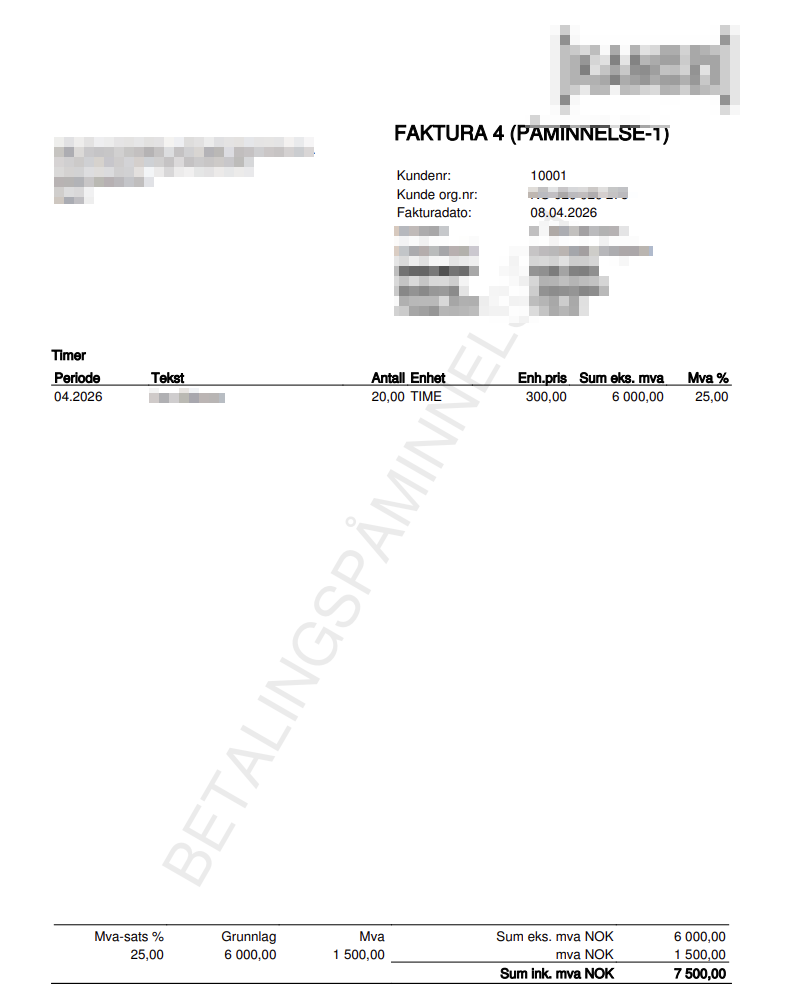
New functions
Chat: Describe Your Issue Before You Talk to Support
What's new? When you open the chat in Project Flow, you now answer three short questions first: What do you need help with? What's going wrong? How is this affecting your work? You can also add a screenshot. Your answers go straight to the support agent, who can start on your issue right away without asking for the basics first. You don't need to enter your name or email address, because you are already signed in.
Where to find it? The chat window in Project Flow.
Budget and Forecast Exchange Rates
This is mainly relevant if you manage currencies and exchange rates in Moment. If you don't, you can skip this part.
Why? Companies had no way to set their own rates for planning, so figures in the company currency could be blank or zero for dates where no market rate was available yet.
What's new? You can now set two kinds of rates. A budget rate is a fixed yearly rate for converting from the project currency to the company currency, and it is locked once you have saved it for the period. A forecast rate applies between two dates and is used for future projections, and overlapping periods are not accepted. All changes to rates are logged. For currencies you already had, you can enter this year's budget rate directly in the currency list. A "Budget rate not updated" warning shows where it is missing, and the rate becomes read-only once you have saved it.
Where to find it?
- Currency management in the settings.
Several Invoice Email Addresses per Customer
Why? The invoice email field accepted addresses that were not valid, which caused failed deliveries, and it held only one address.
What's new? You can now enter several addresses, separated by a comma, a semicolon or the Enter key. Each address is checked as you type. Invalid or duplicate addresses are marked in red with a message, and you cannot save until they are corrected. The validation matches the email field for contacts, and an invoice cannot be sent if a stored address is not valid.
Where to find it?
- The customer main page, in the invoice email address field.
Bug fixes
These were problems that have now been fixed. The numbers are for reference only.
Invoices and currencies
- #1103 - Credit notes imported from Fortnox: A credit note settlement could be recorded twice, once by Moment and once from the import from Fortnox or Visma e-conomic. Credit notes then showed an outstanding balance and the credited invoices looked overpaid. The import now skips settlements that Moment has already recorded. Duplicates created earlier are not removed automatically.
- #2032 - Outstanding value in the Invoices report: The outstanding value kept the project currency after you switched to the company currency. It now follows the selected currency, together with the other amounts in the report.
- #1116 - Actual income in the project economy: The income table added invoices in different currencies as if they were all in the project currency. Each invoice line is now converted, and company currency totals use the exchange rate recorded on each invoice.
- #2206 - Estimated profit in the project report: The planned cost of a project in a foreign currency was converted to the company currency twice, so estimated profit and profit percentage were far too low. The calculation is now correct.
- #1105 - Opening invoice drafts and invoices: Some invoice drafts could not be opened, and an invoice with billed product sales could fail to open for a user without permission to view those records. Both now open.
Offers
- #895 - Tags field in offers: The tags field took up too much space on small screens, with or without tags. It now keeps a compact layout.
- #1028 - Offer page crash: The offer page could crash when neither the offer or invoice language nor English (US) was an active text language. Changes to active languages or company texts could also take time to show because of browser caching. The page now opens and changes appear straight away.
- #1106 - Hours lost when copying an offer: Copying an offer, or hiding a role under Roller, could delete the hours for those roles. A copy now keeps the roles, rates and hours of the original, and hiding a role only hides its column.
- #1115 - Deleting an offer: Deleting an offer could fail with a misleading message while project activities still used its price model. The message now names the project and activities that block the deletion, and "Close connected entities" removes the price model link or tells you if more is needed.
Expenses and files
- #1118 - Receipts in HEIC format: A claim could not be saved when a receipt was a HEIC image saved with a .jpg name, and its thumbnail was broken. The claim now saves, a placeholder is shown when there is no preview, and the original file can still be downloaded.
- #1125 - Overlapping expense entries: Entries in an expense claim were drawn on top of each other, so the text was doubled and unreadable. They are now spaced correctly.
- #2266 - Add expenses from an image: The Add expenses pop-up was blank when you added an expense from an image in the My Travel and Expenses inbox. It now shows all fields and attaches the file.
- #1119 - Slow file pages: File pages, and switching file storage from Moment to SharePoint, could time out after 30 seconds. The queries are now faster, and SharePoint errors are logged in more detail.
Reports and shared hours
- #1120 - Billable time report: The print button missed data when the report was scrolled sideways. It now uses the standard print button from the other reports.
- #1122 - Billable time on shared hours: Changing billable time on an hour shared between partner companies failed when the hour had tags. It now saves.
- #1099 - Moving a co-worker to another company in the group: Hour sharing on all the co-worker's shared projects stopped without warning, and moving the co-worker back did not restore it. Sharing now stops only for links that are actually replaced.
Removed functionality
Scheduled Reports on the To Be Invoiced Page
What's removed? The Scheduled reports option has been removed from the Download menu on the To be invoiced page, because it could not run. Use Download as Excel instead, which follows your current period and sorting. Report files created earlier are still available in your company's file storage.
Was this article helpful?
That’s Great!
Thank you for your feedback
Sorry! We couldn't be helpful
Thank you for your feedback
Feedback sent
We appreciate your effort and will try to fix the article