Milient Support has the ability to log in as your user account within Project Flow (Moment). This feature now lets you control exactly how long Milient Support is granted this access.
Granting access
When Milient Support needs access to your account to help resolve an issue or assist with the software, we will contact you by email at your registered address to request your consent.
The email will look like the example below. Note that it will generally be written in English, since it is sent by the support agent requesting access — before you log in, we don't have visibility into your language settings in Project Flow.
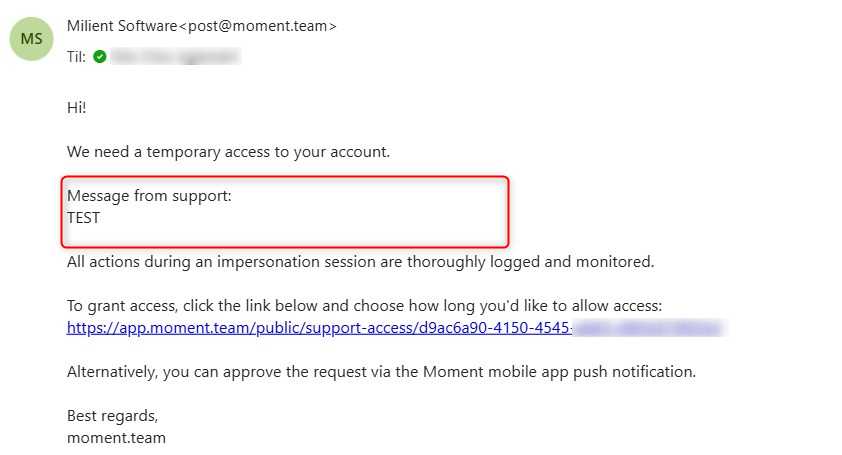
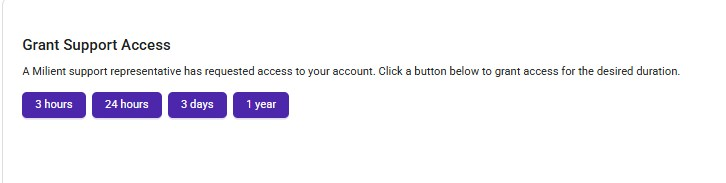
To grant access, click the link in the email. You'll be taken to a page where you can choose how long Milient Support may impersonate your account.
Revoking access
If you want to revoke access you've already granted, contact Milient Support at support@milientsoftware.com.
Company settings
As an administrator, you can control whether your organization's users can be impersonated by Milient Support at all. This setting is found under:/settings/preferences/general → Tools
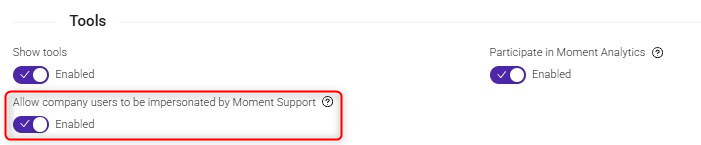
Turning this toggle off will revoke all existing impersonations given by employees in the company.
Logging and audit
Every impersonation session is logged, including who requested access, who approved it, and how long the access was granted for. Milient reviews impersonation access on a regular basis as part of our internal audit process, in line with our stated privacy commitments.
Any changes made to data when impersonating will show as "Milient on behalf of "Name""
Was this article helpful?
That’s Great!
Thank you for your feedback
Sorry! We couldn't be helpful
Thank you for your feedback
Feedback sent
We appreciate your effort and will try to fix the article