What's improved this week
This release makes large admin reports and scheduled tasks faster and more reliable, tightens access control for imported project expenses, and fixes problems with project currencies and the task report export. In short:
- Admin Companies and Users reports now load one page at a time, so they open faster.
- Scheduled tasks are more reliable, and the company list for manual runs opens faster.
- Access control for imported project expenses now sits under Projects and covers only the fields locked by the import.
- You get a clearer message when an organization number can't be saved.
- Changing a project's currency no longer changes the exchange rate on past expenses.
- Several errors in currencies and reports have been fixed.
Changes
Faster Admin Companies and Users Reports
Why? These reports loaded every record at once, which could feel slow when you have many companies or users.
What's changed? The Admin Companies overview and the Users report now load one page at a time. Sorting, filtering, grouping and totals still work across all matching rows, and PDF and Excel exports still include everything.
Where to find it? The Admin Companies overview and the Users report.
Faster Company List When Running Scheduled Tasks Manually
Why? The company selection field took a long time to fill when you ran a scheduled task by hand.
What's changed? The company list now loads faster.
Where to find it? Scheduled tasks, when you run a task manually.
More Reliable Scheduled Tasks
Why? A restart or deployment could erase the fact that a scheduled task had been missed, and the task list could show inconsistent "Last run" times.
What's changed? A missed run is now kept across a restart. Schedules follow the correct time around daylight-saving changes. "Last run" shows the time the run actually started, and the task list opens faster as the history grows. Running a task manually no longer reverts schedule changes made in the background.
Where to find it? Scheduled tasks.
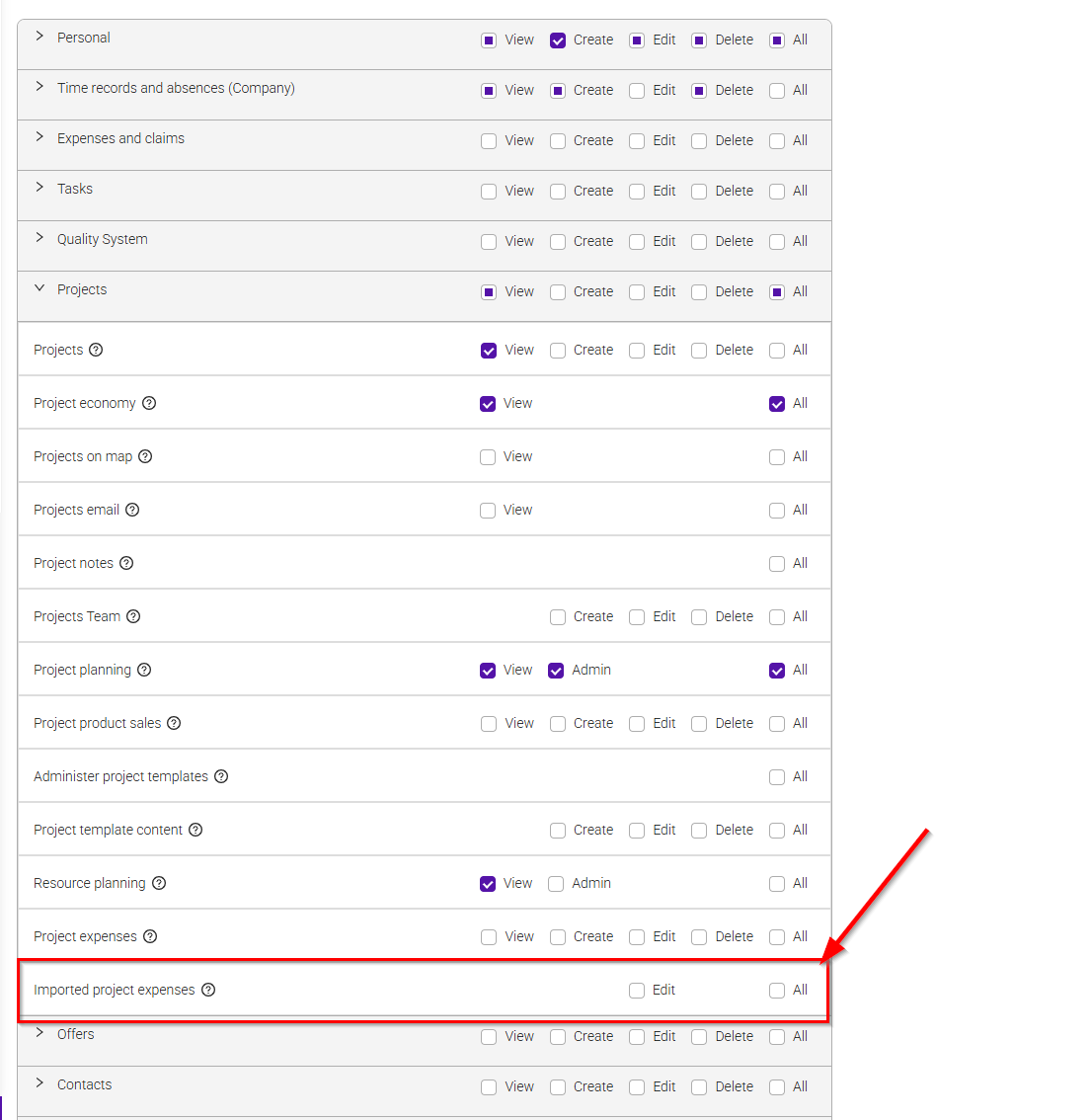
Imported Project Expenses Now Have Their Own Access Control
Why? The permission to edit imported expenses was broader than needed, appeared in two places and duplicated a separate setting in Invoicing.
What's changed? There is a new "Imported project expenses" row under Projects in access control, with a single Edit permission. It lets users correct only the fields the import locks: quantity, unit price, currency, voucher number, period and supplier. All other fields stay under the normal project expenses permission. The separate toggle in the Invoicing settings has been removed, so access control is now the only place to manage this. A tooltip has also been added to the "Project expenses" row.
Where to find it?
- Access control, under Projects.
- Invoicing settings, where the old toggle used to be.
Clearer Message for Duplicate Organisation Numbers
Why? Saving an organisation number that was already in use gave a general message that changes could not be saved.
What's changed? You now see: "This organisation number can't be saved. Verify the number and try again."
Where to find it? Company details, when you save an organisation number.
Bug fixes
These were problems that have now been fixed. The numbers are for reference only.
Projects and currencies
- #1802 - Changing a project's currency: Changing the currency of a project re-stamped every past expense with today's exchange rate, so earlier costs and margins changed silently. Each expense now keeps the rate from its own date, and invoiced expenses are left untouched.
- #1819 - Missing exchange rate: When an exchange rate was missing, you got a general server error. The message now names the currency pair, for example NOK to DKK. This applies to project budgets, invoices, price definitions, subscriptions and reports.
Reports
- #2120 - Task report export: When the task report was sorted by Assigned to with no grouping, the exported file did not match the screen. The export now has the same tasks and order as you see in the app.
Removed functionality
Nothing has been removed in this release.
Was this article helpful?
That’s Great!
Thank you for your feedback
Sorry! We couldn't be helpful
Thank you for your feedback
Feedback sent
We appreciate your effort and will try to fix the article