Find My Pages in the main navigation menu.
This is your personal workspace within the system. It gives you quick access to everything related to your daily work, including timesheets, absences, tasks, projects, travel expenses, notifications, training, and personal settings.
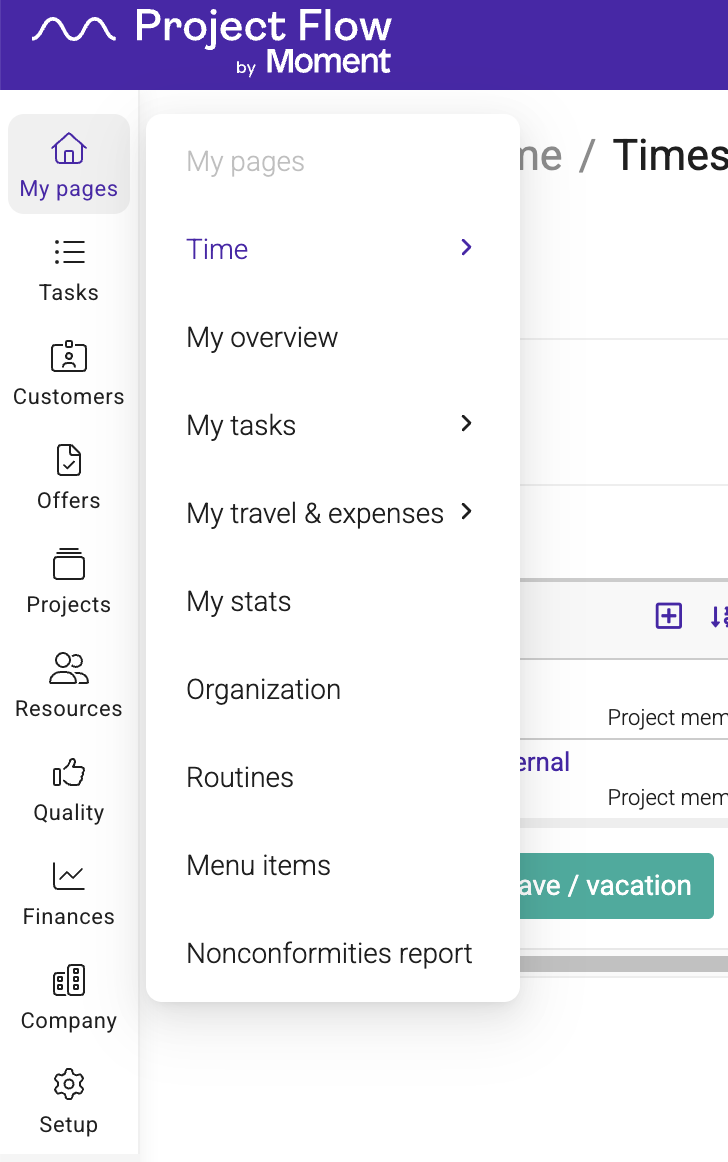
It brings together the tools and information you use most often.
You can use it to:
- Track your working hours and absences
- Manage tasks and projects
- Submit travel and expense claims
- View personal statistics and notifications
- Access training, routines, and assigned company equipment
Note: The menu items available to you depend on your permissions, company settings, and enabled modules.
Time
The Time submenu contains personal time-related pages.
Timesheet
Register your worked hours
Hours report
View detailed reports of registered hours
Time balance
View accumulated flexitime and overtime balance
Absence overview
View a visual overview of absences and leave
Absence report
View detailed absence registrations
Planned absence
Register and review upcoming absences
My tasks
Manage your assigned tasks.
The My tasks menu includes:
- My task board
- My calendar
- My planning
Module: Tasks
Project management
Available for users with project management permissions.
The Project management menu may include:
- Project overview
- To be invoiced
- Project report
- Hours report
- Invoices
My Travel & Expenses
View and manage expenses related to projects you are working on.
The Travel and Expense menu includes:
- New expense
- Claims
- Inbox
My stats
View personal statistics and performance information.
Permissions required
Organization
View the company structure and departments.
Permissions required
Routines
Access company routines, procedures, and manuals.
Module: Quality
Menu items
Customize your personal navigation menu and sidebar.
Nonconformities report
Report and follow up quality deviations and nonconformities.
Module: Quality
Was this article helpful?
That’s Great!
Thank you for your feedback
Sorry! We couldn't be helpful
Thank you for your feedback
Feedback sent
We appreciate your effort and will try to fix the article