Find Performance by going to Company → Performance.
The Performance page helps you analyze utilization, capacity, planning, and actual work across employees, teams, and departments.
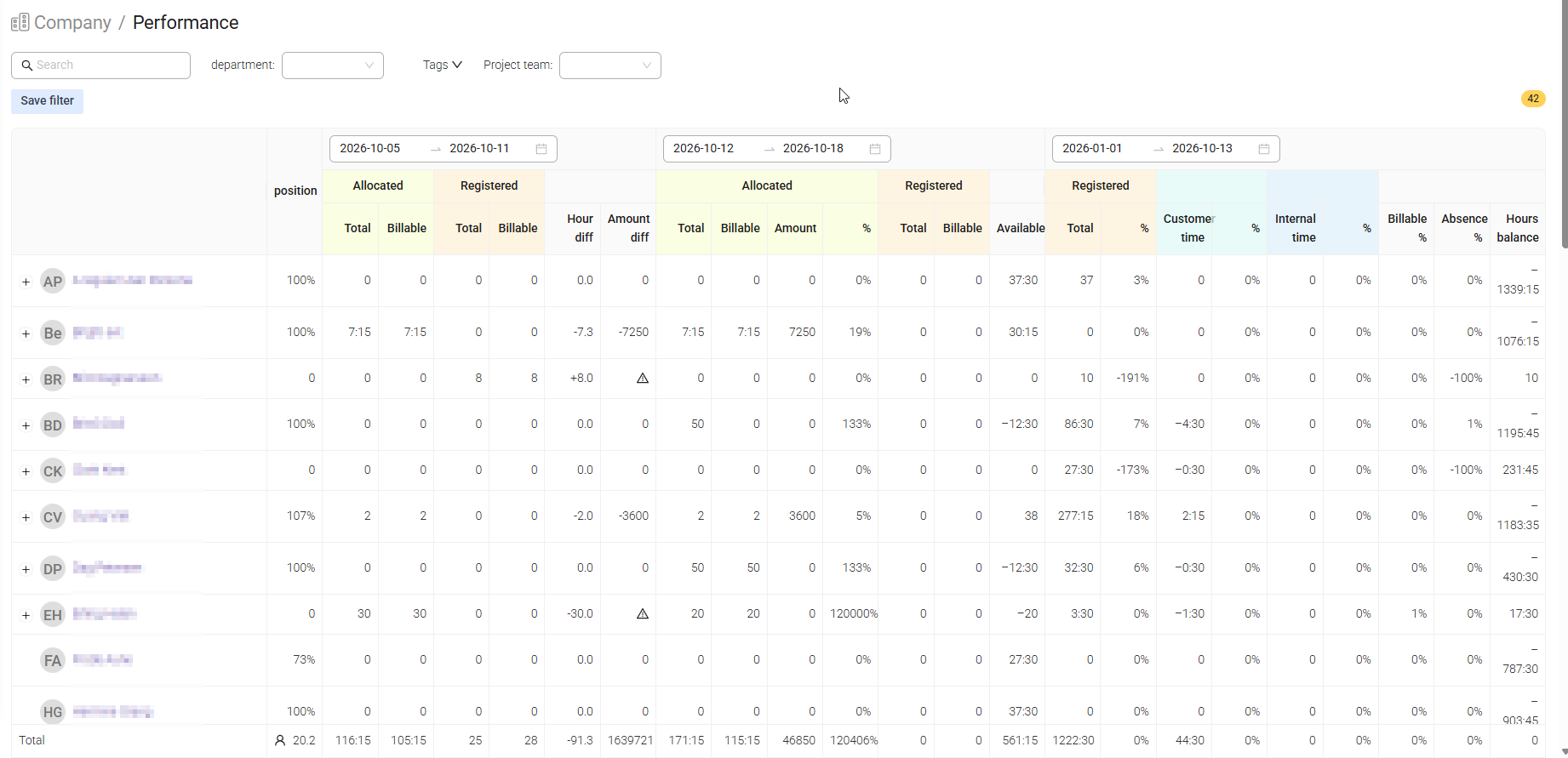
Use it to compare planned and actual work, track utilization over time, and understand both individual and team performance.
The Performance page gives you a clear overview of how work is planned and delivered across your organization.
You can use it to:
- Compare planned hours with registered hours
- Track billable utilization
- Analyze team and employee performance
- Review available capacity
- Identify over-allocated or underutilized resources
- Compare different periods side by side
Use the filters at the top of the page to select which employees are included.
You can filter by:
- Department – Employees belonging to a specific department
- Co-worker tags – Employees with selected tags
- Project team – Members assigned to a specific project

Note: When multiple filters are used, only employees matching all selected criteria are included.
Was this article helpful?
That’s Great!
Thank you for your feedback
Sorry! We couldn't be helpful
Thank you for your feedback
Feedback sent
We appreciate your effort and will try to fix the article