New changes in Project Flow
What's improved this week
This release adds a Company contacts report for site administrators, lets price lists be opened from a project by project owners, and makes import errors easier to follow. It also gives clearer messages in several places and fixes a number of errors in reports, absence, capacity and invoices. In short:
- Site administrators get a new Company contacts report, and companies can open new projects on the "From template" tab by default.
- Project owners can open the price list from their project.
- Imports report progress and name the rows and fields that failed.
- Clearer messages when approving hours without a required description, when an organisation number is invalid, and when a company is disabled.
- News in the notifications dropdown can now be read one item at a time.
- Several errors in reports, absence, capacity, invoices and claims have been fixed.
Changes
News in Notifications Can Be Read One Item at a Time
Why? Clicking one news item marked all newer news as read, so you could miss items you had not opened.
What's changed? Each news item now has its own read state. Clicking an item removes only that item and lowers the unread count by one. "Mark all as read" now also clears news. The news list in the help drawer shows a "Last read" divider, and new users only see news published after their first login.
Where to find it?
- The notifications dropdown.
- The news list in the help drawer.
Clearer Message When Approving Hours Without a Required Description
Why? If a project was set to require a description after hours had been registered without one, approving those hours gave only a general "Failed to update" message.
What's changed? The message now names the projects that require a description, up to three projects, with a count of any others. It explains that you can add a description, return the hours for correction, or turn off the requirement in the project settings. Hours missing a required description can also be returned for correction.
Where to find it? Approving hours.
Clearer Message for an Invalid Organisation Number
Why? Saving an invalid organisation number gave a general "Failed to save" message, so it was not clear what was wrong.
What's changed? Company and customer settings now show a translated message saying that the organisation number is invalid for the selected country.
Where to find it? Company settings and customer settings, when you save an organisation number.
New functions
Company Contacts Report
This is mainly relevant if you are a site administrator. If you are not, you can skip this part.
Why? There was no single place to see which contact person each company has.
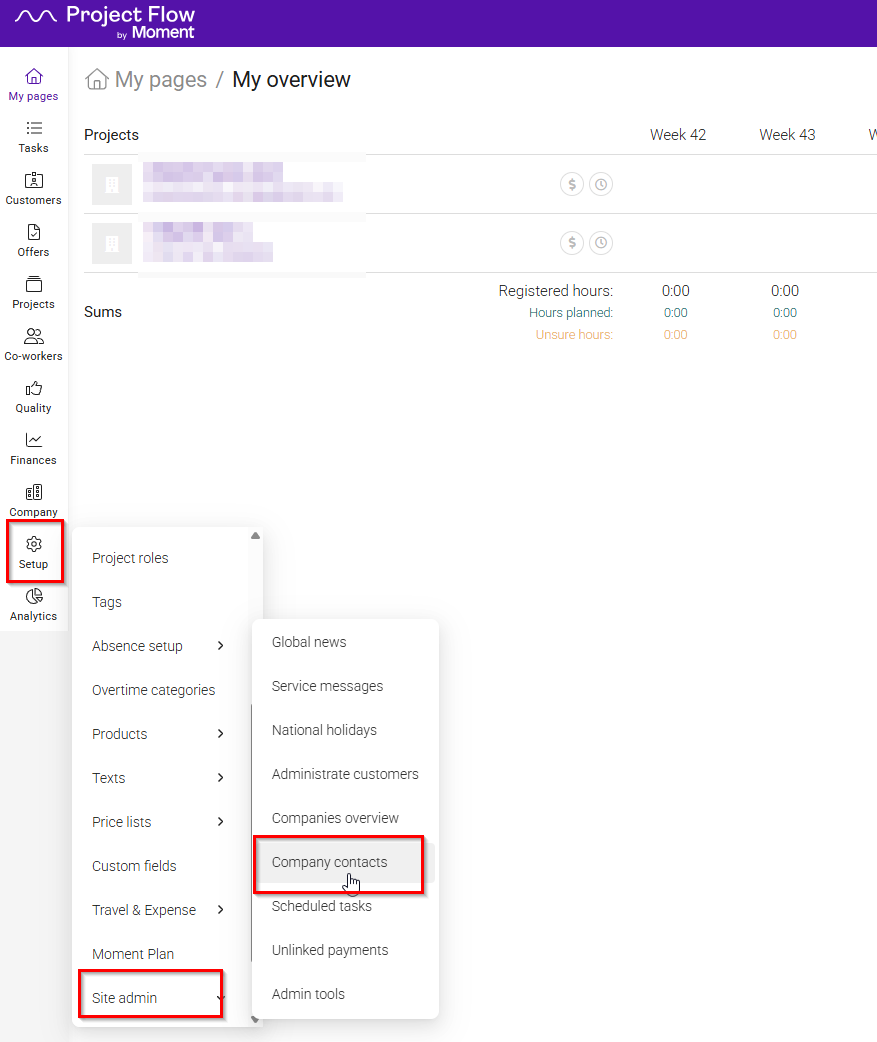
What's new? A new report lists every company with its legal-matters contacts and administrators, and a contact status: OK, No legal responsible available, or No contact person found. You can export the report to Excel.
Where to find it?
- Site Admin, in the new Company contacts report.
Create Projects From a Template by Default
Why? If your company creates most projects from templates, you had to open the "From template" tab each time.
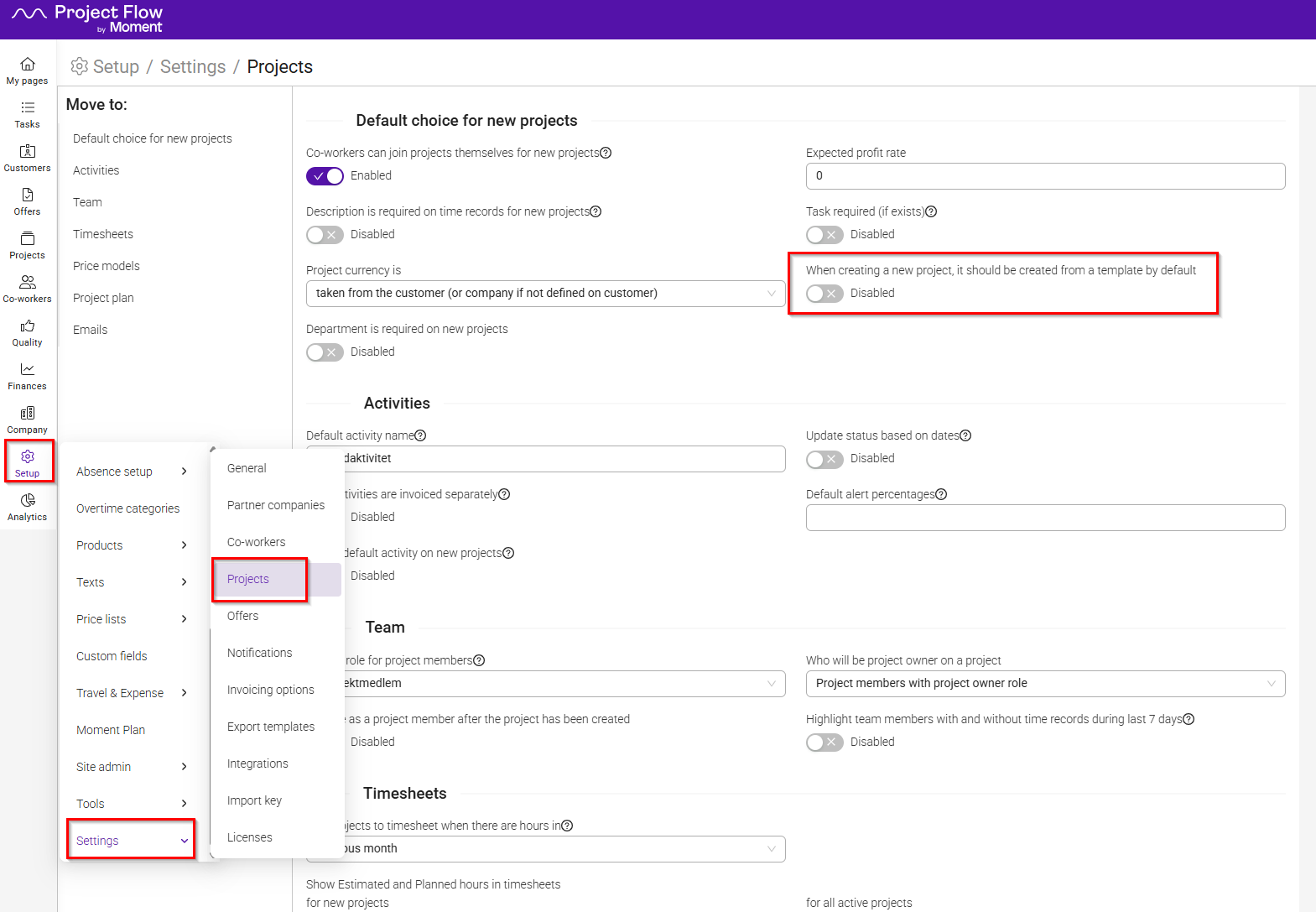
What's new? A new company setting makes the "From template" tab the default when someone creates a new project. You can set it to Enabled or Disabled.
Where to find it?
- Company settings, in the project settings.
Price Lists for Project Owners
Why? Project owners who are regular users got a 404 page when they opened the price list from their project, so they could not check roles and rates.
What's new? Project owners can now open the price list from their project in a read-only view. Access is controlled by a new project permission to view co-worker hourly rates.
Where to find it?
- The price list link in a project.
Clearer Progress and Error Reports for Imports
This is mainly relevant if you import data into Moment. If you don't, you can skip this part.
Why? When an import took a long time, you got no feedback on how far it had come or whether it had worked.
What's new? Long-running imports now report progress and finish with a success or error report. The report names the rows and fields that failed, so you can correct them. You can also stop an import.
Where to find it?
- Import.
Bug fixes
These were problems that have now been fixed. The numbers are for reference only.
Reports
- #1093 - Sorting the Absence report by time: Sorting by time did not order the registered hours correctly. It now sorts them numerically, both ascending and descending.
- #992 - Selecting rows in the hours report: Rows without a checkbox could be selected. They can no longer be selected.
Absence, forecasts and capacity
- #1070 - Absence overview: The absence overview, on the co-worker tab and for the company, was empty for users who may view or approve absences but cannot edit co-workers. It now shows the absences.
- #1072 - Forecast approval: Approving a forecast failed for users without the "View co-workers" permission. It now works.
- #2170 - Department filter in the Capacity view: The filter counted only reservations on projects in the selected department, so reserved and available capacity were wrong. It now counts all reservations of the department's co-workers. The filter is renamed "Co-worker department".
Invoices, projects and claims
- #1073 - PDF for older invoices: Generating a PDF for older or migrated invoices did nothing and gave no message. The PDF is now created, and you get an error message if it fails.
- #1803 - Missing exchange rates: When an exchange rate was missing, the invoiced total in company currency was counted as zero without a warning. It is now shown as not calculated, with a warning on the project budget, periodization and the Projects report.
- #2175 - Approving a claim: Approving a travel or expense claim failed when the project had an unassigned member and "Set coworker on project expense" was ticked. The claim now goes through, and the claim owner, not the approver, is added to the project.
Settings and API
- #1092 - API keys: The API keys list showed only the first 10 keys, so the others could not be edited or deleted. It now lists every key, newest first, with paging.
- #2121 - Filtering project membership roles through the API: Filtering by co-worker tags and departments together could time out. It now works, and only returns roles where one membership matches all the filters.
Removed functionality
Nothing has been removed in this release.
Was this article helpful?
That’s Great!
Thank you for your feedback
Sorry! We couldn't be helpful
Thank you for your feedback
Feedback sent
We appreciate your effort and will try to fix the article