Updated: Adding and editing project and activity members
Managing project and activity members is now simpler. We've replaced several different modals with two: one for projects, one for activities. They're available in all the same places as before.
What's new
- Add unassigned roles using the "New team membership" button
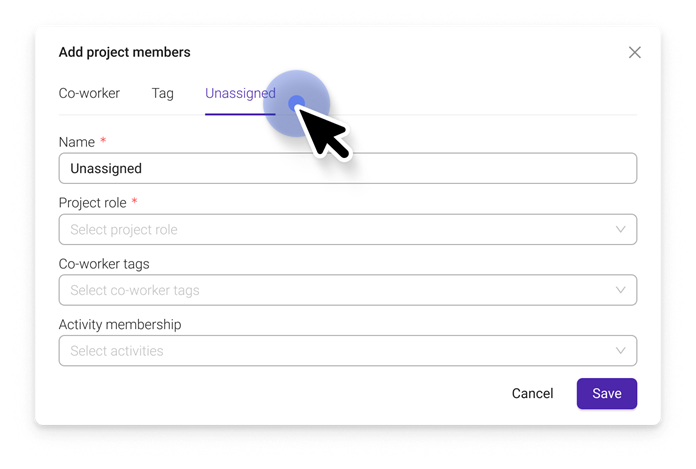
- Add a new project member to activities straight away using the dropdown
- See a summary of planned hours across all and selected activities for a co-worker while editing
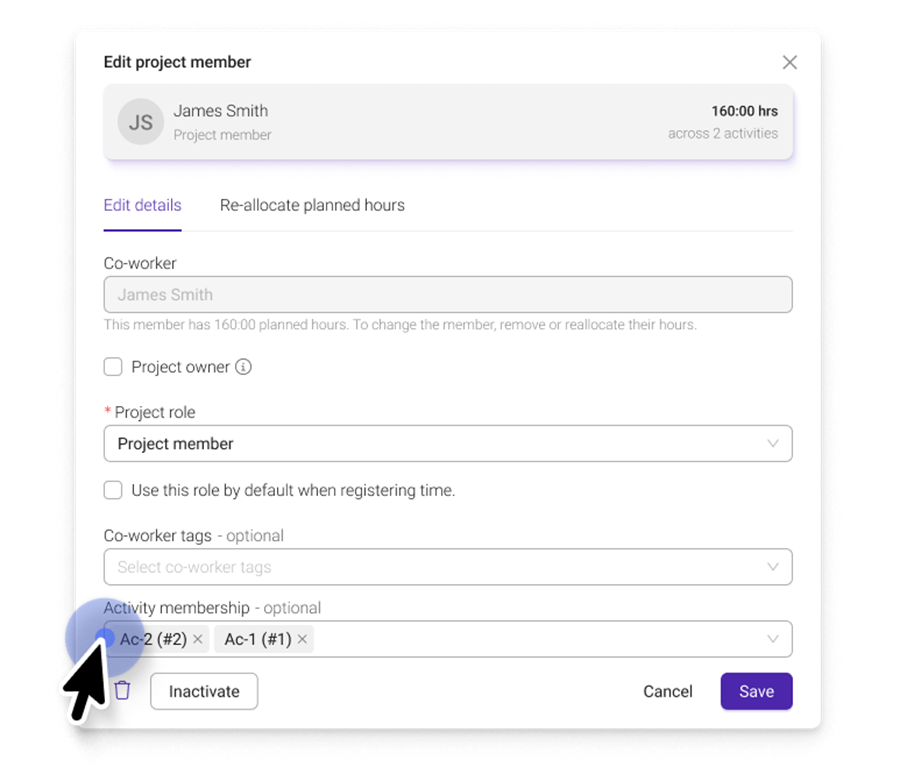
- Edit and re-allocate hours for unassigned memberships
What works the same
- The modals are in all the same places — nothing has moved
- You can still add a whole team by selecting co-worker tags, now found under the new Tags tab
- You can still edit activity memberships and move hours to another activity or co-worker
What's changed
- "Assign co-worker" is now "Reallocate planned hours." It works the same way, but the name better reflects what it does. It reassigns all upcoming planned hours across activities to the new co-worker.
- Moving hours now has two clear options. Use Move planned hours to move hours to another activity, or Reallocate planned hours to move them to another co-worker. This only affects hours on that specific activity.
- The project plan now uses the same updated modal.
- Leaving a comment on a project member is no longer available.
Was this article helpful?
That’s Great!
Thank you for your feedback
Sorry! We couldn't be helpful
Thank you for your feedback
Feedback sent
We appreciate your effort and will try to fix the article