This page allows you to manually export invoices to your accounting system when automatic transfer fails or is not enabled.
You typically use this when:
- Invoices are missing in accounting
- Testing integrations
- Updating customer or project data
Where to find it
Setup → Tools → Export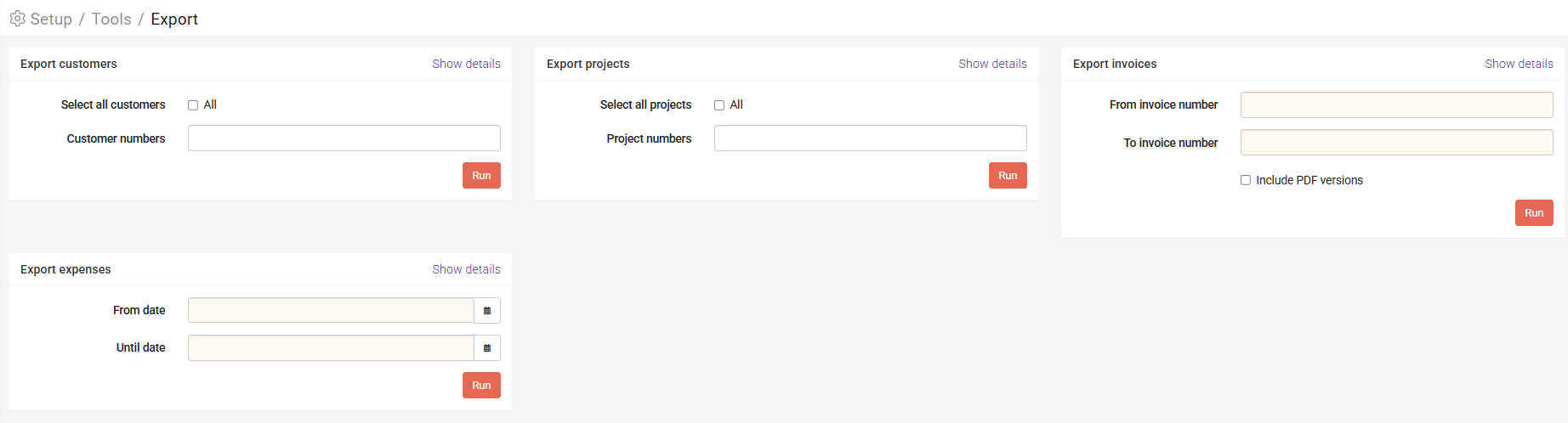
Common tasks
Export a single invoice
- Enter the same invoice number in both fields
- Click Run
Export multiple invoices
- Enter "From" and "To" invoice numbers
- Click Run
All invoices within the range will be included. :contentReference[oaicite:4]{index=4}
Include PDF attachments
- Enable Include PDF version before exporting
Verify export
To confirm successful export:
- Go to Company → Logs
- Search for the invoice
Logs help verify whether invoices and data were transferred successfully. :contentReference[oaicite:5]{index=5}
Important notes
- Changes to customer or project data require re-export
- Some integrations allow multiple exports, others do not
Common mistakes
- Not checking logs after export
- Using incorrect invoice range
- Forgetting to include PDFs when needed
Next steps
- Check Logs for errors
- Review integration settings if issues persist
Was this article helpful?
That’s Great!
Thank you for your feedback
Sorry! We couldn't be helpful
Thank you for your feedback
Feedback sent
We appreciate your effort and will try to fix the article